Localization Is a Process, Not a Feature
Localization Is a Process, Not a Feature
In the first post, I covered localization architecture — what to localize at which layer, how to tier your locales by engineering cost, and why localization is a system-wide decision, not a UI feature.
This post is about what happens after you get the architecture right. Production finds the gaps.
In Post 1, I told the architecture story — how a German character broke our search. That was about where localization lives. This is about when it breaks.
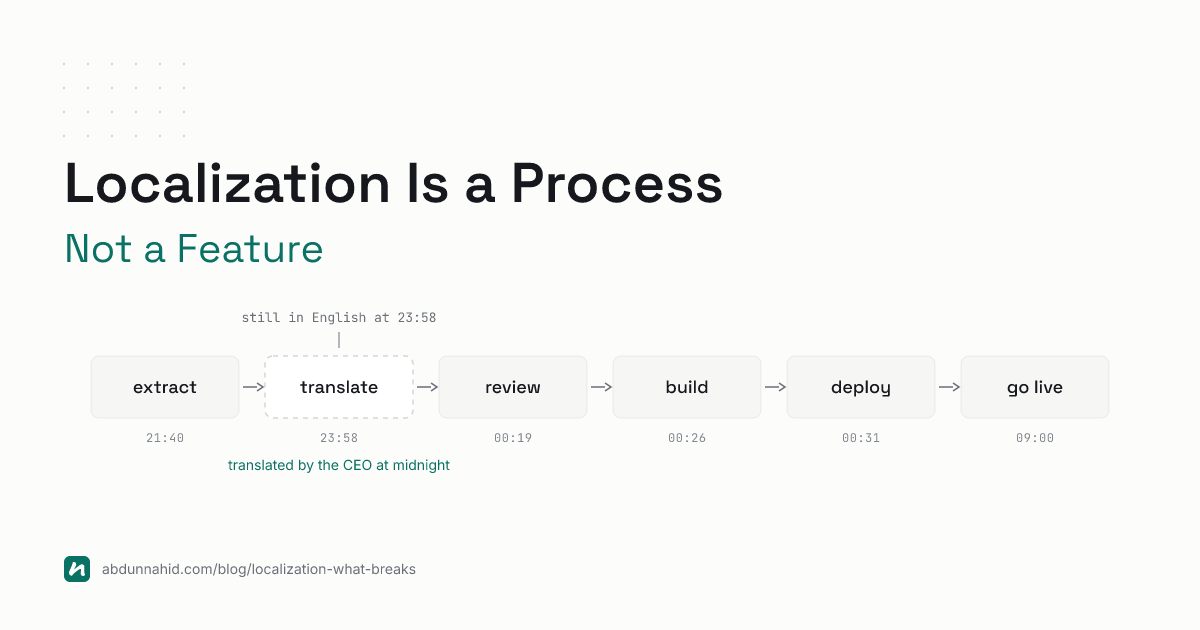
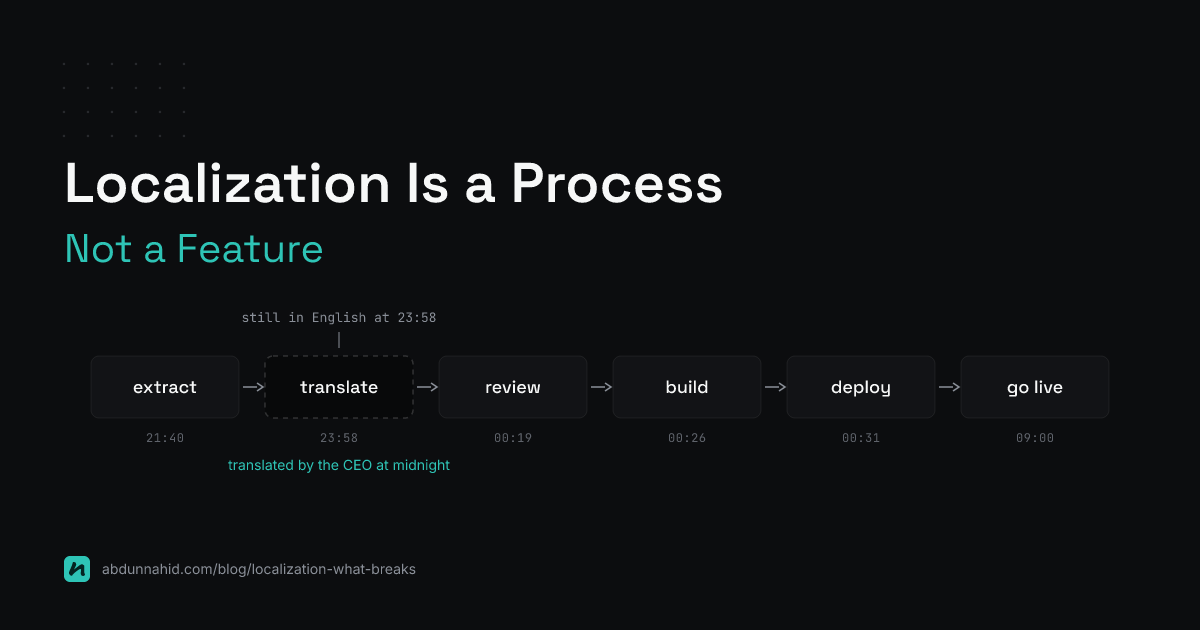
The night before our Go Live, we found an entire section of the application still in English. The onboarding tutorials and guidelines. Those components were built after the initial translation batch — continuously updated during the final sprint. Nobody flagged them for re-translation. There was no process to flag them.
We pulled the new strings and reached for the translator. Except the translator’s contract had ended. They were gone.
We got lucky. The CEO of SELISE - a native Swiss speaker, was still awake. It wasn’t his job to translate UI strings at midnight. It was his generosity that he did. I copied German and French text I couldn’t read into JSON files while he dictated, hoping nothing broke the layout. The tutorials had zero functional value to the application. But they were the first thing every user would see after logging in. In that moment, they were the most important thing in the application.
Localization isn’t just architecture. It’s a process with human dependencies, timing constraints, and contractual realities.
When Search Returns Nothing
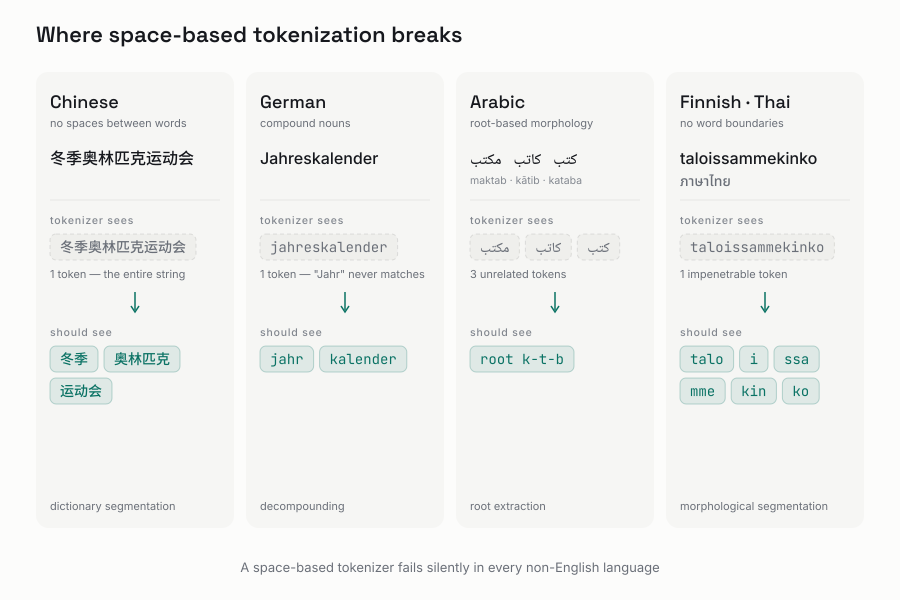
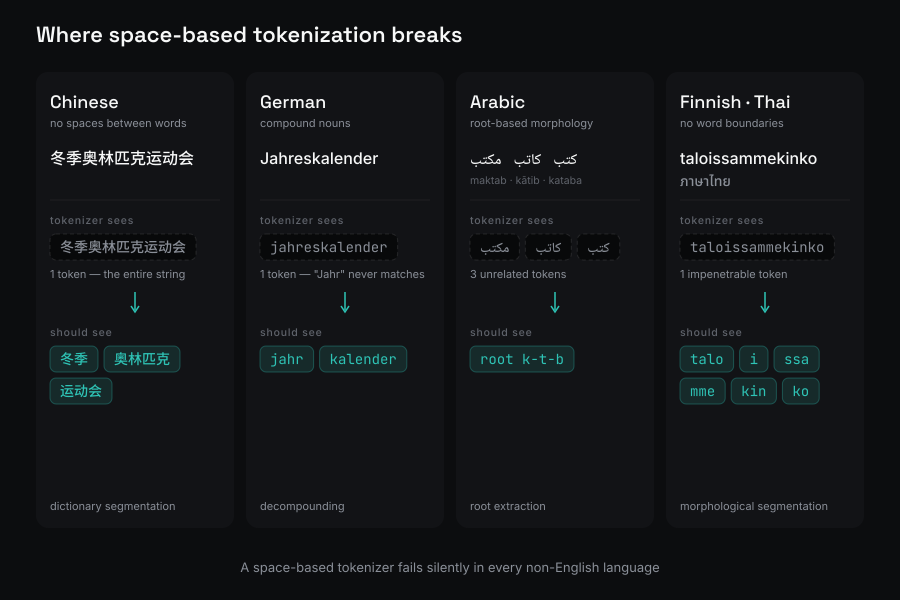
A search index that works perfectly in English silently fails in most other languages. Not because the data is missing - because the tokenizer can’t find the words.
English tokenization is straightforward: split on spaces, strip punctuation, lowercase everything. The same approach collapses the moment you leave Latin-script languages with space-separated words. [1]
Chinese, Japanese, Korean: No spaces
“冬季奥林匹克运动会” means “Winter Olympics.” It’s one continuous string of characters. A space-based tokenizer sees one token and stops. A user searching “Olympics” gets zero results even though the document is exactly about the Olympics. [1]
Chinese requires dictionary-based segmentation - a tokenizer like jieba that knows which character sequences form words. Japanese needs kuromoji, which understands the morphological boundaries between kanji, hiragana, and katakana. Korean needs nori, which separates nouns from their attached postpositions (는/은/를/을). Without a language-specific tokenizer, CJK search is broken by default [1].
German: Compound words eat your recall
German builds nouns by compounding: “Jahreskalender” = “Jahr” (year) + “Kalender” (calendar). “Schuljahr” = “Schule” (school) + “Jahr.” A search for “Jahr” should match all of these - plus “Jahre” (plural) and “Jahren” (plural dative). [2]
A standard analyzer sees “Jahreskalender” as one token. Searching “Jahr” returns nothing. You need a decompounding analyzer that knows German morphology and can split compounds into their constituent parts [2].
Arabic: The root problem
Arabic words derive from triconsonantal roots. “كتب” (kataba - he wrote), “كاتب” (kātib - writer), “مكتب” (maktab - office) all share the root k-t-b. A Porter stemmer - designed for English suffix-stripping - does nothing with this. You need a root-extraction stemmer specific to Arabic morphology [1].
Thai, Finnish, Turkish: Boundaries don’t exist
Thai has no spaces between words at all. Line-breaking is dictionary-based. Finnish builds words by chaining suffixes: “taloissammekinko” = “also in our houses?” A tokenizer without language-specific rules sees one impenetrable token. [3]
Two ways to index
You have two choices for multilingual search architecture [1]:
Unified index with language fields. One index, a lang field on each document, language-specific analyzers applied per field at index time. Simpler to manage but harder to tune relevance per language. Works for smaller multilingual corpora.
Dedicated indices per language. products_en, products_de, products_ar - each with its own tokenizer, stemmer, and stop words. Better relevance because queries only hit the right index. More operational overhead (schema changes × N languages). This is what most enterprise search deployments use.
What each search backend actually supports
MongoDB’s built-in $text operator supports about 15 languages through the default_language parameter. It doesn’t handle CJK tokenization at all. One language per index. If your collection has documents in five languages, you’d need five separate text indexes - and you’d need to query the right one. [10] This is why serious multilingual search moves to Elasticsearch or MongoDB Atlas Search (Lucene-based, 40+ language analyzers, CJK tokenizers) [2] [3].
A practical gotcha: MongoDB $text uses a single analyzer per index. [10] If you don’t know the query language ahead of time, you’re guessing which index to hit. Language detection helps — Elasticsearch has a built-in lang_ident_model_1 [2] — but detection fails on short queries. Always provide a manual language selector as fallback.
What this means for your pipeline: Adding a language isn’t just translating strings. It’s verifying that your tokenizer, stemmer, and analyzer actually work for that language. If your CI pipeline or integration test suite doesn’t verify search relevance per locale, you’ll learn about the gap from a support ticket, not a build failure.
Sorting: The Collation Problem
I covered the collation rules in detail in Post 1 of this series — Swedish ÅÄÖ sorting after Z, French accents sorting from the end of the word, German phonebook vs dictionary collation. Here’s the practical takeaway that matters in production.
MongoDB supports collation({ locale: "de", strength: 1 }) [11] — the collation algorithm itself is the Unicode Collation Algorithm [4]. But each locale-specific sort multiplies your index count. Supporting five languages means five indexes on the name field. That’s five times the storage and write overhead per indexed field. The cost compounds with every new locale you add, and you won’t notice until queries slow down or your storage bill arrives.
The process lesson: Every new locale with its own collation means a new database index. Your database administrator needs to know about it before the migration — not after the deployment when queries time out. Add “locale-specific index creation” to your launch checklist.
Measurement Units: Territory, Not Language
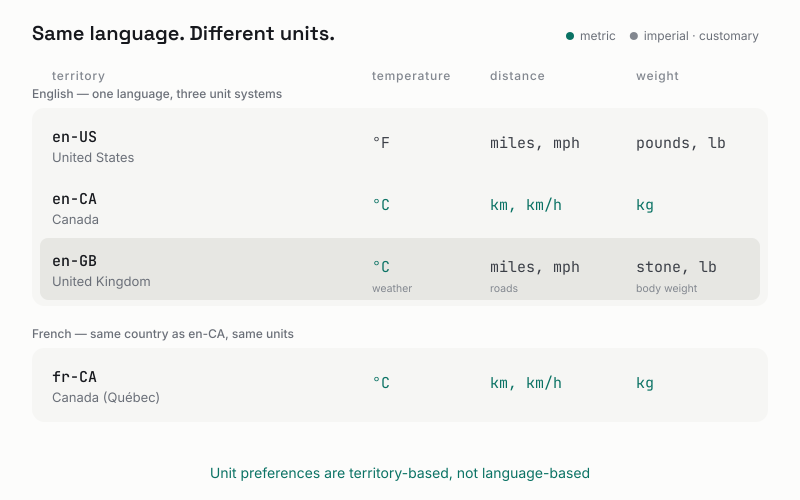
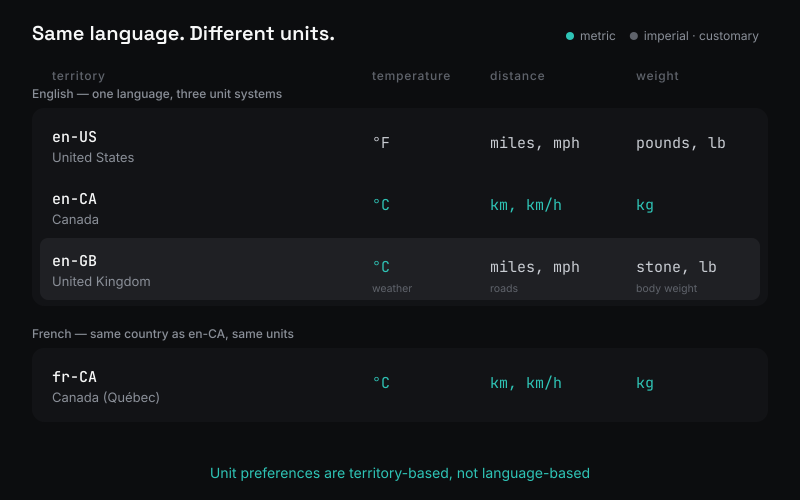
Here’s something most developers get wrong: measurement units are territory-based, not language-based.
An English speaker in London uses Celsius. An English speaker in Houston uses Fahrenheit. Same language, different units. You cannot derive measurement preferences from the language code.
en-US→ miles, pounds, Fahrenheiten-CA→ kilometers, kilograms, Celsiusen-GB→ miles for roads, Celsius for weather, stone for body weight (yes, all three systems in one country)fr-CA→ metric (same units as France, different language from English Canada) [5]
The UK is the hardest locale for units. Celsius for weather. Miles for roads. Stone and pounds for body weight (but kilograms in medical contexts). Pints for beer and milk (but liters for everything else). There’s no programmatic rule that captures this — it’s domain-specific. A weather app shows °C, a driving app shows miles, and a fitness app might show stone or kilograms depending on the user. CLDR’s territory-based unit preferences handle the locale-level defaults, but the domain override is your responsibility. [5]
CLDR handles display, not conversion
The browser has this built in through Intl.NumberFormat [5]:
// Temperature
new Intl.NumberFormat('en-US', { style: 'unit', unit: 'celsius' }).format(25)
// "25°C"
new Intl.NumberFormat('en-US', { style: 'unit', unit: 'fahrenheit' }).format(77)
// "77°F"

// Speed
new Intl.NumberFormat('de-DE', { style: 'unit', unit: 'kilometer-per-hour' }).format(120)
// "120 km/h"

// Volume - display length variants
(16).toLocaleString('en-GB', { style: 'unit', unit: 'liter', unitDisplay: 'long' })
// "16 litres"
(16).toLocaleString('en-US', { style: 'unit', unit: 'liter', unitDisplay: 'long' })
// "16 liters"
CLDR formats the number and appends the correct unit symbol. It does not convert. If your backend stores Celsius and your US user wants Fahrenheit, you do the math (°F = °C × 9/5 + 32), then format the result with CLDR.
The pattern: store canonical, display local
Backend:    stores 25 (canonical: °C)
            stores 100 (canonical: km/h)
            stores 75 (canonical: kg)

Frontend:   en-US user → converts + formats → "77°F", "62 mph", "165 lb"
            de-DE user → formats → "25 °C", "100 km/h", "75 kg"
            en-GB user → formats → "25°C", "62 mph", "11 st 11 lb"
Store in SI/metric as the canonical unit. Convert per user preference. Format per locale using CLDR. Never store formatted strings in the database.
The operational takeaway: Unit preferences change. A user moves from the US to Germany and suddenly wants Celsius. Your system needs a way for users to see and update their measurement preferences — and every display layer needs to respect that preference without manual conversion logic scattered across the codebase.
Production Caveats
Text expansion: German is 30% longer
When you design a UI in English, you’re designing in one of the most compact languages. German translations are 30-35% longer on average. Finnish is 30-40% longer. Short strings expand dramatically - a 4-character “Save” becomes 9-character “Speichern” (+125%) in German, 11-character “Enregistrer” (+175%) in French [6] [7].
The fix: design layouts for text expansion from the start. Use flexible containers, not fixed widths. Allow text to wrap. Test with German or Finnish as your stress-test language. If your layout survives 40% expansion, it handles virtually any language.
Pseudo-localization automates this testing: replace source strings with expanded, accented variants before translations arrive, and catch truncation bugs in CI instead of production [7].
RTL: It’s not just direction: rtl
Adding Arabic or Hebrew means every pixel of your layout needs to work right-to-left. CSS direction: rtl flips text alignment, but margins, paddings, transforms, and icons don’t flip automatically. Use CSS logical properties:
/* Wrong */
.element { margin-left: 16px; }

/* Right - works in both LTR and RTL */
.element { margin-inline-start: 16px; }
I haven’t shipped an RTL product myself. What I know comes from research. If RTL is on your roadmap, budget time for a full layout audit. If you’re on Angular, the CDK’s Directionality provider and Angular Material’s built-in RTL support handle the heavy lifting — Dir directive, rtl CSS class toggling, and automatic mirroring of Material components. But third-party components and custom layouts still need manual verification. [13]
Unicode normalization: identical strings that aren’t
é can be represented as a single codepoint (U+00E9) or as e plus a combining accent (U+0065 + U+0301). They look identical. They are different strings. If your search index uses one form and the query uses the other, they won’t match. Normalize to NFC at input boundaries. [12]
The broader point: Most of these caveats are testable before you ship. Pseudo-localization in CI catches truncation bugs. RTL testing catches layout failures. Unicode normalization at input boundaries catches matching bugs. The question isn’t whether these problems exist — it’s whether your pipeline finds them before your users do.
AI in the Localization Pipeline
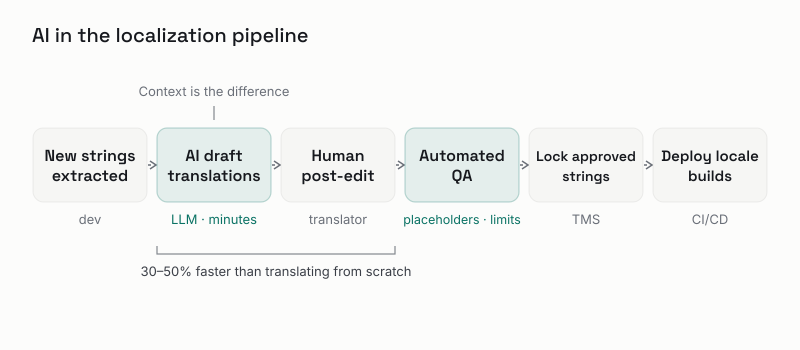
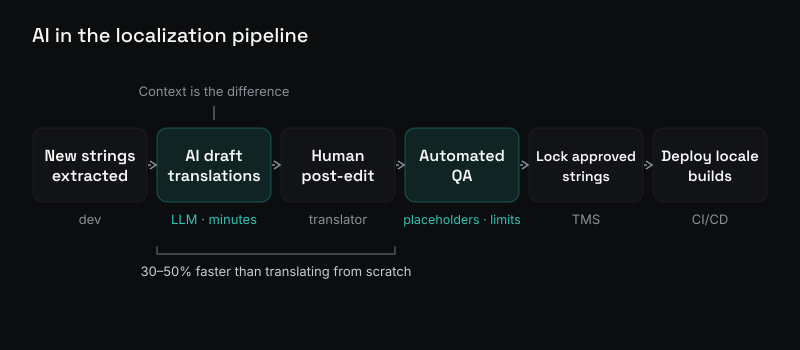
The previous sections covered what breaks. This section covers what helps. AI won’t replace human translators, but it will compress the feedback loop and catch what humans miss.
Placeholder translations - unblock development
The classic bottleneck: a developer adds new UI strings, extracts them, sends to translators, waits days or weeks. Development stalls or ships with English fallbacks.
An LLM can produce initial translations for every new string within minutes. Not production-quality, but good enough to unblock development and testing. By the time the human translator delivers the final version, the UI is already built and tested for layout. This is AI post-editing: AI produces the first draft, a human reviewer polishes it - typically 30-50% faster than translating from scratch [8].
Edge case detection - finding what you missed
Automated QA catches structural errors in translations that humans overlook: broken placeholders, character limit violations, HTML tag integrity, length ratio anomalies, capitalization inconsistencies.
Beyond translation QA, AI can scan the codebase for localization gaps. An agent with context about your i18n framework can find hardcoded strings, missing i18n attributes, concatenated strings that will break in translation (“Welcome, ” + name), and components added after the last translation batch. This is the kind of mechanical checking that AI excels at and humans are terrible at.
Context is the difference
Traditional machine translation (DeepL, Google Translate) is fast and consistent but operates on individual sentences with no understanding of your product. An LLM with proper context - project description, tone instructions, character limits, placeholder rules - produces translations that feel native [8]:
| String | MT (no context) | AI (with context) |
|---|---|---|
| “Home” (nav label) | “Hogar” (physical home) | “Inicio” (navigation) |
| “Free” (hotel booking) | “Gratis” (free of charge) | “Libre” (unoccupied) |
| “Exit” (modal button) | “Salida” (generic exit) | “Cerrar” (close button) |
The difference is the context payload: what the product is, who it’s for, what tone to use, what constraints apply. Define it once, and every translation request inherits it.
Domain adaptation - toward production quality
For enterprise use, AI can be adapted to domain-specific terminology and style. Two approaches:
Static adaptation: Fine-tune a model on the enterprise’s translation memory. The model learns preferred terminology, formality, and brand voice. Produces consistently on-brand output but requires significant data and periodic retraining [9].
On-the-fly adaptation: At translation time, retrieve the most similar past translations and include them as examples in the prompt. The LLM matches the style of the examples. No training required - but depends on having good examples available.
The Swiss insurance domain is a strong candidate for this. Insurance terminology is specialized and high-stakes. The translation memory accumulated across projects could prompt a domain-aware model that produces initial translations already using correct insurance terminology in German, French, and Italian.
The Process Reality
The midnight translation with the CEO taught me something that no architecture document covers: localization is a process with human dependencies. A translator isn’t an API. They have contracts, availability, and end dates. Every sprint that adds or changes UI needs a localization checkpoint.
SELISE eventually built UILM - a central localization management tool customizable to our stack. The lesson wasn’t “build your own tool.” It was that no single off-the-shelf solution covered everything we needed: extraction, translation memory, review workflow, CI/CD integration, and domain-specific terminology management across Angular, .NET, and MongoDB.
You’ll likely assemble and customize, not buy one thing. The tools exist for each step (Lokalise, Crowdin, Phrase for TMS; XLIFF for interchange; ICU for formatting). The orchestration - making them work together as a pipeline - is the actual engineering work.
The Real Cost, Continued
Architecture without process is a plan that survives exactly until the first production launch.
That German ö taught me that localization lives in every layer. The midnight translation taught me that it lives in every timeline too. You can’t extract strings once and call it done. You can’t assume the translator will be available when you need them. You can’t treat the least functional content as the least important - because users see it first.
The post-launch glow after that midnight session was real. The app shipped, in three languages, with tutorials that made sense to actual Swiss users. But I don’t recommend learning the lesson that way.
References
[1] Translated. “Multilingual Search Implementation: A Search Engine Localization Guide.” https://translated.com/resources/multilingual-search-implementation-guide
[2] Devins, Josh. “Multilingual Search Using Language Identification in Elasticsearch.” Elastic Blog. 2020-02-12. https://www.elastic.co/blog/multilingual-search-using-language-identification-in-elasticsearch
[3] Typesense. “Tips for Locale-Specific Search.” 2026-05-15. https://typesense.org/docs/guide/locale.html
[4] Unicode. “Unicode Collation Algorithm (UTS #10).” https://www.unicode.org/reports/tr10/
[5] MDN Web Docs. “Intl.NumberFormat.” https://developer.mozilla.org/en-US/docs/Web/JavaScript/Reference/Global_Objects/Intl/NumberFormat
[6] W3C Internationalization. “Text Size in Translation.” 2007. https://www.w3.org/International/articles/article-text-size
[7] i18n Agent. “Text Expansion in i18n.” 2026. https://i18nagent.ai/en/guides/text-expansion-testing
[8] SimpleLocalize. “AI and Machine Translation for Software Localization.” 2026. https://simplelocalize.io/blog/posts/ai-machine-translation-guide/
[9] Lavie, Alon. “Enterprise-Specific Machine Translation Adaptation with LLM-based Technology.” Phrase. 2026-04-07. https://phrase.com/blog/posts/enterprise-mt-llm-adaptation/
[10] MongoDB. “Text Indexes.” https://www.mongodb.com/docs/manual/core/index-text/
[11] MongoDB. “Collation.” https://www.mongodb.com/docs/manual/reference/collation/
[12] Unicode. “Unicode Normalization Forms (UAX #15).” https://unicode.org/reports/tr15/
[13] Angular Material. “Angular CDK — Bidirectionality.” https://material.angular.io/cdk/bidi/overview