Localization Is Architecture, Not Translation
Localization Is Architecture, Not Translation
I learned what localization actually costs because of a single character ö.
First year at SELISE, building my first multilingual enterprise application for the Swiss insurance market. We’d done the translation work — every button, label, and error message in German, French, Italian, and English. The app shipped. It looked great.
A week later, a bug report landed. An admin couldn’t find a user in the user list. The user could log in — their account existed — but search returned nothing. Why? Their surname had an ö in it. The search index was default to English and didn’t know how to handle German characters. And when the list did load, their name was in the wrong place too. Their name appeared at the very end of the list. A German speaker expects ö to sort as a variant of o — it should be among the O names, not after every name in the alphabet.
We’d translated the UI. We hadn’t localized the system. And one character exposed the difference.
That’s the thing about localization. It’s not a translation task that lives in the frontend. It’s a property of your entire stack - search, sorting, data storage, email templates, PDF generation, logging. It touches designers who need to plan for 30% text expansion in German. Product managers who decide which locales are worth the engineering cost. QA engineers who test in languages they can’t read. Translators who need context, not just strings.
If you write code, design interfaces, manage products, or test software — localization affects you. The only question is whether you learn that before launch or after.
Translation Is Not Localization
Most developers think localization means “swap the strings and ship.” That’s translation. Localization is far beyond translation. It starts when your English “Settings” button (8 characters) becomes “Einstellungen” in German (13 characters, +62%) and “Paramètres” in French (10 characters, +25%) and neither fits your carefully designed 100px button. And goes far beyond that.
Here’s what localization actually covers beyond translated text:
- Date and time formats -
03/07/2026means March 7th in the US, July 3rd in Germany, and 3rd July in the UK. Your date picker, your API timestamps, your report headers - all of them need to know this. [14] - Number and currency formats -
1,234.56in the US is1.234,56in Germany and1 234,56in France. The decimal separator, the thousands separator, and the symbol position all change. [10] - Pluralization - English has two forms (one book, many books). Russian has four. Arabic has six. A simple “1 item(s)” pattern breaks the moment you leave English.
- Gender agreement - In French, German, Italian, and most non-English languages, adjectives and articles change based on the gender of the noun. “Welcome, {name}” becomes a branching decision tree.
- Sorting order - The Swedish alphabet has three extra letters (Å, Ä, Ö) that sort after Z. In German, they sort as A and O variants. A naive
ORDER BY namegets this wrong. [5]
And those are just the visible ones. Under the surface, there’s search tokenization (Chinese has no spaces between words), measurement units (an English speaker in London uses Celsius; one in Houston uses Fahrenheit), and text direction (Arabic and Hebrew read right-to-left).
Translation is one piece. Localization is the whole system.
The Culture Distance Framework
Not all locales are created equal. Some are essentially free to add. Others require fundamental architecture changes. The key is knowing which is which before the product team adds “support Arabic” to the roadmap.
| Tier | Cost | What changes | Example |
|---|---|---|---|
| Tier 1 — Close | Config-only | Same format cluster. Different spellings, same date/currency formats, same direction. No code changes needed. | en-US → en-GB → en-AUde-DE → de-AT → de-CH |
| Tier 2 — Medium | ICU logic + config | Different format rules, same text direction. Thousands separators change, plural forms increase, grammatical case appears. ICU handles the logic; no layout rework. | English → French, German, Italian, Russian |
| Tier 3 — Far | Architecture change | Different writing system or direction. RTL layout, CJK fonts, line-breaking rules, search tokenization — all work differently. | English → Arabic, Hebrew, Chinese, Japanese, Korean |
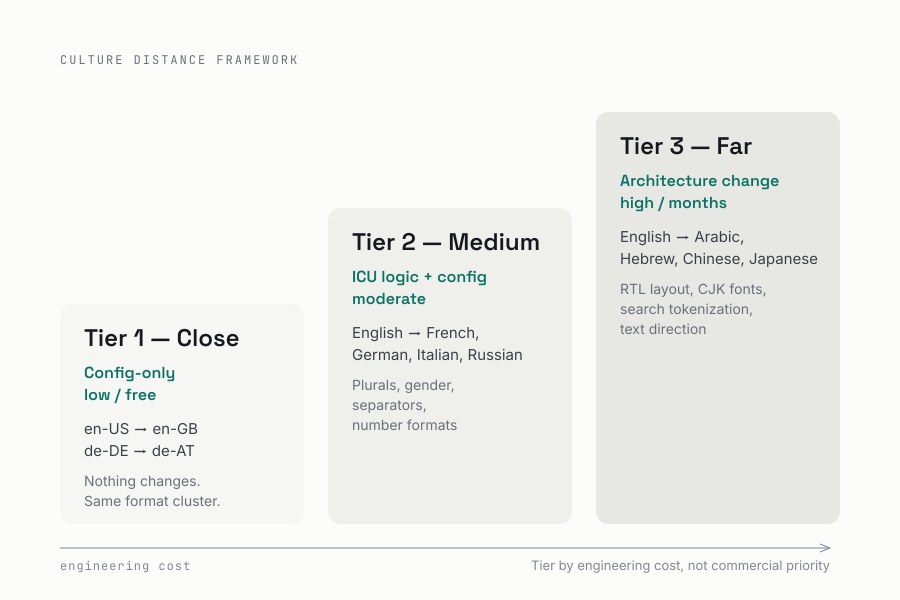
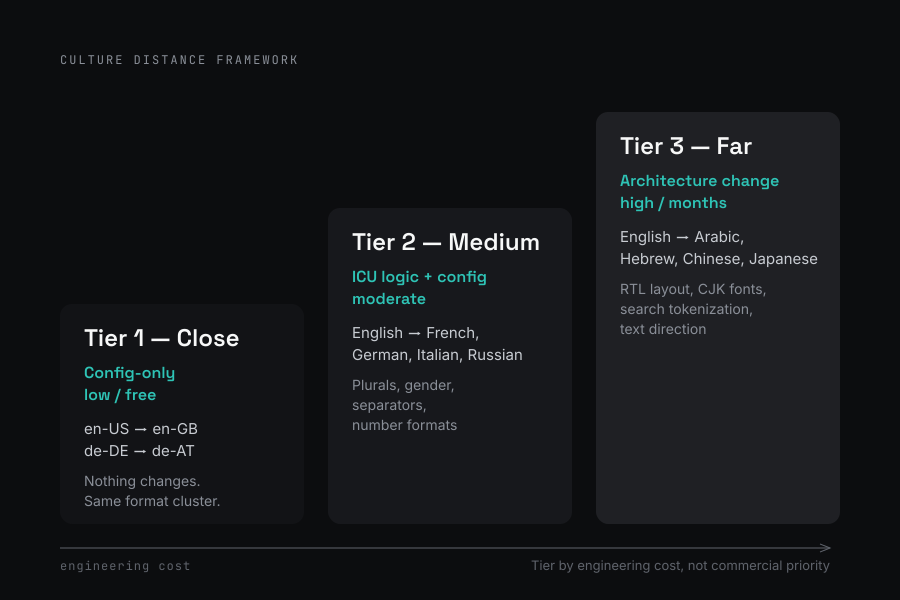
At SELISE, our platform ships in English, German, French, and Italian. All four are Tier 1–2 languages — same text direction, Latin script, similar format rules. Adding Italian after German was incremental work. Adding Arabic would require rethinking every layout, every search index, and every font stack. The cost difference between Tier 2 and Tier 3 is measured in months, not days.
The framework is simple: Tier your locales by engineering cost, not commercial priority. A PM may want Arabic because there’s a market opportunity. That’s valid. What’s not valid is treating it like adding French - which might take a day - when it actually requires rethinking your entire layout system.
What Goes Where: Layer-by-Layer
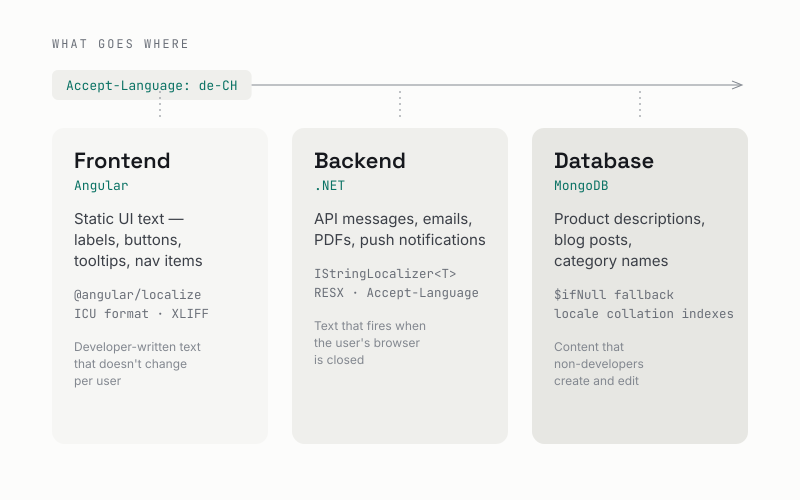
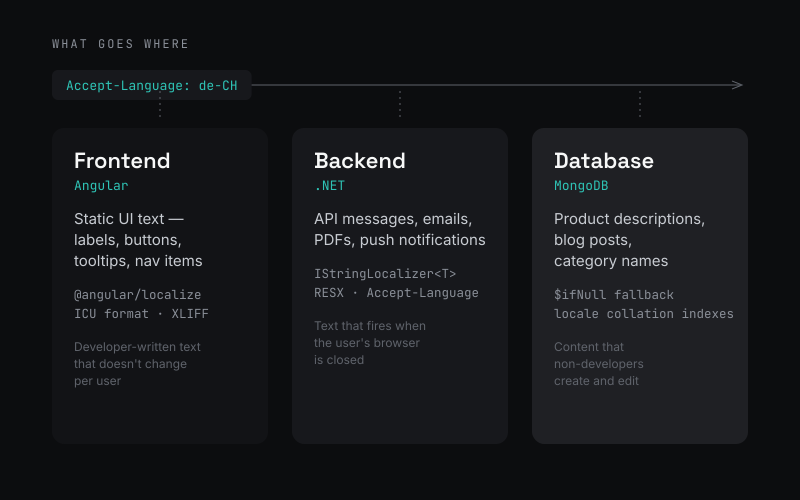
The most common localization mistake I see is dumping everything in the frontend. Labels, error messages, email templates, product descriptions - all translated in Angular i18n or React i18next, and nothing else. That’s how you end up with a German ö breaking your search.
Localization needs a home in every layer. Here’s a decision framework for what lives where.
Frontend: Static UI text
Labels, buttons, tooltips, placeholder text, navigation items. Text written by developers that doesn’t change per user. This lives in your frontend i18n framework.
For Angular, the built-in @angular/localize handles this through the i18n attribute [1]:
<h1 i18n="@@welcomeHeader">Welcome to our platform</h1>

<button i18n="@@saveButton">Save</button>

<span i18n="@@itemCount">
  {count, plural, =1 {1 item} other {{count} items}}
</span>
Extract with ng extract-i18n, send the XLIFF file to translators, get locale-specific files back, build per locale. The critical detail: Angular’s built-in i18n supports ICU [6] message format - plurals, gender selection, nested conditions. Third-party libraries like ngx-translate [12] are translation tools, not localization frameworks. They swap strings at runtime but don’t handle pluralization or gender rules [7].
Backend: API messages, emails, PDFs
Validation errors, notification emails, generated PDFs, report headers. Text that originates on the server and may fire asynchronously - when the user’s browser locale isn’t available.
In .NET, IStringLocalizer<T> with RESX resource files handles this [2] [3]:
public class InvoiceController(IStringLocalizer<InvoiceController> L)
{
    [HttpPost]
    public IActionResult Generate([FromBody] InvoiceRequest request)
    {
        var emailBody = L["InvoiceGeneratedBody", request.Number];
        // "Invoice #{0} has been generated."
        // → "La facture n°{0} a été générée."

        return Ok(new { message = L["Success"] });
    }
}
The middleware sets the culture from the Accept-Language header, a cookie, or a user profile setting. The backend sends structured data (dates as ISO 8601, numbers as raw values) and human-readable messages (validation errors, email bodies) that it localizes itself.
Rule of thumb: if the text appears while the user’s browser is closed like an email, a PDF attachment or a push notification, the backend localizes it.
Database: User-generated and managed content
Product descriptions, blog posts, category names, dropdown values. Content that non-developers create and edit. This goes in your database with language tagging - not in your i18n resource files.
The pattern I’ve landed on for MongoDB is a denormalized map with fallback:
{
  "_id": "prod_123",
  "sku": "WH-42-BLK",
  "price": 29.99,
  "name": {
    "en": "Wireless Headphones",
    "fr": "Casque sans fil",
    "de": "Kabelloser Kopfhörer",
    "it": "Cuffie senza fili"
  },
  "description": {
    "en": "Noise-cancelling Bluetooth 5.3...",
    "fr": "Casque Bluetooth 5.3 à réduction de bruit..."
  }
}
Query with fallback - if the requested language is missing, fall back to English using MongoDB’s aggregation pipeline:
db.products.aggregate([
  { $match: { sku: "WH-42-BLK" } },
  { $project: {
    sku: 1,
    price: 1,
    name: { $ifNull: ["$name.de", "$name.en"] },
    description: { $ifNull: ["$description.de", "$description.en"] }
  }}
])
This is readable, efficient, and supports fallback without extra collections. For many languages or frequently-changing content, a separate translations collection works better — but the denormalized map covers most cases.
ICU: Plurals, Gender, and Currency
The ICU message format (International Components for Unicode) handles the hard parts of localization - the grammar rules that vary by language. Most developers encounter it for the first time when “1 item(s)” breaks in production [4] [6].
Plurals: English is the easy case
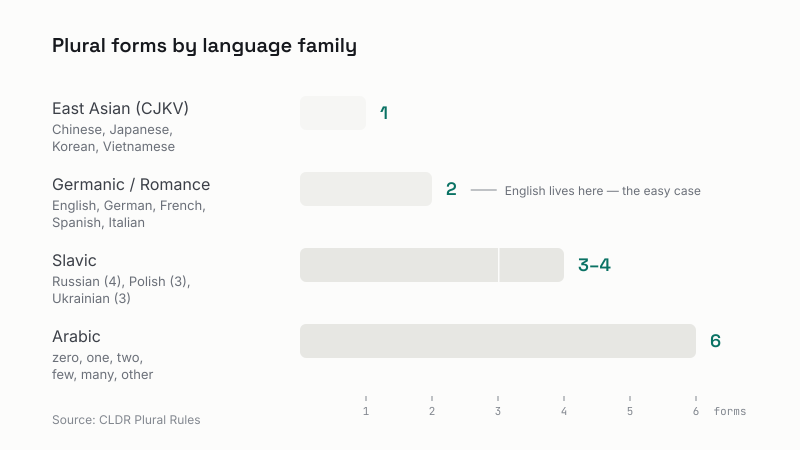
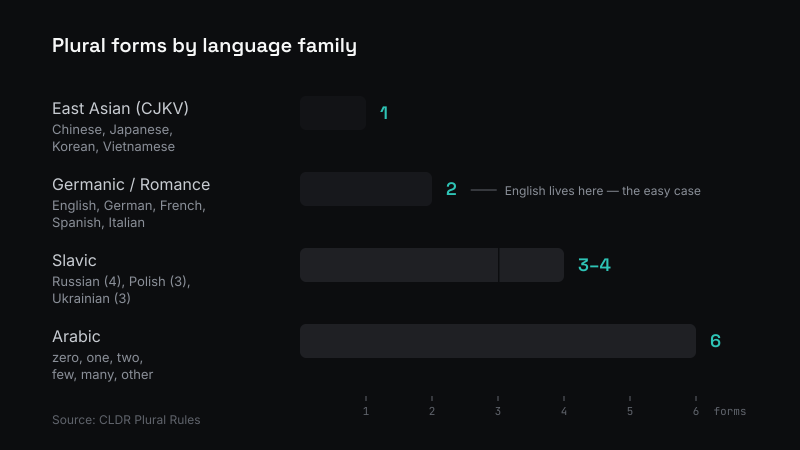
English has two plural forms: singular and plural. That’s it. Most other languages have more:
| Language family | Plural forms | Example |
|---|---|---|
| Chinese, Japanese, Korean, Vietnamese | 1 form | Same text for 0, 1, 1000 |
| English, German, French, Spanish | 2 forms | one / other |
| Russian, Polish, Ukrainian | 3-4 forms | one=1, few=2-4, many=5+ |
| Arabic | 6 forms | zero, one, two, few, many, other |
Source: CLDR Plural Rules [4]
A naive if count === 1 breaks the moment you add Russian. ICU handles this with a selector:
{count, plural,
  =0 {No notifications}
  =1 {1 notification}
  few {{count} notifications}
  many {{count} notifications}
  other {{count} notifications}
}
The ICU engine picks the right form based on CLDR plural rules for the locale. You don’t write the logic - you provide the translations, and the engine selects.
Gender: sometimes you can’t avoid it
In romance and slavic languages, adjectives and past participles agree with the grammatical gender of the subject. “Logged in” might be “connecté” (masculine) or “connectée” (feminine) in French. In Arabic, even the verb conjugation changes.
ICU handles this with selectors [8]:
{gender, select,
  male {Welcome back, Mr. {lastName}}
  female {Welcome back, Ms. {lastName}}
  other {Welcome back, {firstName}}
}
The practical advice: avoid gendered patterns when you can. Use the user’s name instead of pronouns. When you can’t avoid it, branch on known gender with a neutral fallback. Finnish and Turkish don’t even have gendered pronouns - the whole problem disappears if your UI design doesn’t create it.
Currency: locale is not currency
$1,234.56 could be USD, CAD, AUD, or any of a dozen other dollars. A French user invoicing in USD still expects French number formatting - 1 234,56 $US. A Japanese user expects no decimal places for yen - ¥1,234 [10].
The pattern: store the amount and ISO 4217 currency code separately [13]. Format at display time using CLDR. Never store formatted currency strings in the database - you can’t sort them, you can’t convert them, and you can’t re-format them for a different locale.
Sorting: Why ORDER BY Name Lies to You
The Unicode Collation Algorithm (UCA) defines how text sorts in each language across four comparison levels: base letters, accents, case, and punctuation. What sorts correctly in one language sorts wrong in another [5].
A few examples that have tripped up real production systems:
- Swedish: Å, Ä, and Ö are separate letters that sort after Z. A Swedish user expects “Örebro” at the bottom of a city list, not between “Oslo” and “Paris.”
- German: Ä sorts as A, Ö as O, Ü as U. But German has two collation rules - phonebook (ö = oe) and dictionary (ö is a variant of o). They produce different sort orders for the same text.
- French: Accents sort from the end of the word backward. “côte” sorts before “coté” - the opposite of what an English speaker expects.
- Chinese: Characters don’t sort by visual shape. Pinyin order is the standard, but Unicode codepoint order (what you get by default) is meaningless to a Chinese reader.
MongoDB supports locale-specific collation [11] - collation({ locale: "de", strength: 1 }) - but each locale-specific index multiplies your index count. Five supported languages means five indexes on the same field. This isn’t free.
When Not to Localize
Not everything needs localization. Knowing when to skip it is as important as knowing how to implement it.
At SELISE, the insurance platform spans customer-facing portals, internal admin dashboards, APIs, email templates, reporting tools, and system integrations. The customer claims portal supports four languages, it has to. Swiss customers expect service in their language. The admin dashboard, used by five technical operators viewing charts and statistics, doesn’t need localization at all. The engineering cost of i18n is wasted on an internal tool that five people use in English.
On my side project, mybikes.app - an Ionic Angular app for tracking bike maintenance - I translated the UI into multiple languages using ngx-translate [12]. But I didn’t localize number formatting, didn’t handle pluralization rules, and didn’t touch the backend. Numbers stay the same regardless of language. The app appends “km” or “mi” as a label. That’s translation, not localization.
And it’s fine. It’s a lifestyle app for a niche, not a banking system. The UX tradeoff - unformatted numbers with translated labels - is acceptable for its audience. The engineering cost of full ICU pluralization and locale-specific builds would be wasted on this app.
Localization is a spectrum, not a binary. You choose where to land based on your product, your users, and your constraints. The skill is knowing the difference.
- Customer-facing insurance portal in Switzerland? Full localization across all tiers.
- Lifestyle mobile app for personal use? Translation-only. String swapping with symbol labels.
- Internal admin dashboard for five operators? Skip it entirely.
- etc.
All three are correct decisions — for their context.
The Real Cost
When localization is an afterthought, every new language is a fire drill. Strings get hardcoded. Concatenation breaks word order in French ("Welcome, " + name assumes the greeting comes first - it doesn’t in every language). Search stops working in German. Sorting breaks in Swedish. Adding a second language to a system that hardcoded everything is a rewrite.
When you treat it as architecture from day one - decide early what lives where, which locales are essentially free and which require real work - adding a fourth language is incremental. The engineering cost curve flattens instead of spiking.
That German ö taught me the difference. Don’t wait for your own special character to teach you.
But architecture is only half the story. The other half is what happens in production — when search returns nothing, when sorting lies, and when you find yourself doing translations at midnight. Continue reading: Localization Is a Process, Not a Feature.
References
[1] Angular. “Angular Internationalization (i18n).” https://angular.dev/guide/i18n
[2] Microsoft Learn. “Globalization and Localization in ASP.NET Core.” https://learn.microsoft.com/en-us/aspnet/core/fundamentals/localization
[3] Microsoft Learn. ”.NET Localization.” https://learn.microsoft.com/en-us/dotnet/core/extensions/localization
[4] Unicode CLDR. “CLDR Plural Rules.” https://cldr.unicode.org/index/cldr-spec/plural-rules
[5] Unicode. “Unicode Collation Algorithm (UTS #10).” https://www.unicode.org/reports/tr10/
[6] Unicode ICU. “ICU Message Format.” https://unicode-org.github.io/icu/userguide/format_parse/messages/
[7] Lokalise. “Angular i18n with Examples.” https://lokalise.com/blog/angular-i18n/
[8] Crowdin. “ICU Message Format Guide.” https://crowdin.com/blog/icu-guide
[9] W3C Internationalization. “Text Size in Translation.” 2007. https://www.w3.org/International/articles/article-text-size
[10] MDN Web Docs. “Intl.NumberFormat.” https://developer.mozilla.org/en-US/docs/Web/JavaScript/Reference/Global_Objects/Intl/NumberFormat
[11] MongoDB. “Collation.” https://www.mongodb.com/docs/manual/reference/collation/
[12] ngx-translate. “NGX-Translate: The internationalization library for Angular.” https://github.com/ngx-translate/core
[13] ISO. “ISO 4217 — Currency Codes.” https://www.iso.org/iso-4217-currency-codes.html
[14] MDN Web Docs. “Intl.DateTimeFormat.” https://developer.mozilla.org/en-US/docs/Web/JavaScript/Reference/Global_Objects/Intl/DateTimeFormat